> ## Documentation Index
> Fetch the complete documentation index at: https://developer.onetrust.com/llms.txt
> Use this file to discover all available pages before exploring further.
# Display User Interfaces
# Overview
The OneTrust SDK manages several different user interfaces to display to a User. Before showing how to display them, please review the list of interfaces below.
[block:parameters]
{
"data": {
"h-0": "Name",
"h-1": "Description",
"h-2": "Method to Show",
"0-0": "Banner",
"0-1": "Notice to the user of their privacy rights. Has configurable text and buttons for **Accept All**, **Reject All**, **Manage Preferences**, and **Close Banner**.
**Note:** Each of these buttons can be toggled On/Off in the Admin Console.",
"0-2": "`setupUI()`
`showBannerUI()`",
"1-0": "Preference Center",
"1-1": "An interface for the user to view their current profile settings and update their choices based on the configuration provided for them. Has configurable text and buttons for **Accept All**, **Reject All**, **Save Settings**, and **Close Preference Center**.
**Note:** You can choose to hide each button except **Save Settings** - this is required for a User to update their choices.",
"1-2": "`setupUI()`
`showPreferenceCenterUI()`",
"2-0": "Purpose Details",
"2-1": "The Purpose Details (or Category Details) view shows granular detail about the category and also shows the **SDK LIst** link, **Vendor List** link, and child categories based on configuration.",
"2-2": "-"
},
"cols": 3,
"rows": 3,
"align": [
null,
null,
null
]
}
[/block]
> The user interfaces without methods indicate they can only be navigated to based on User navigation and Admin Portal settings.
## `setupUI`
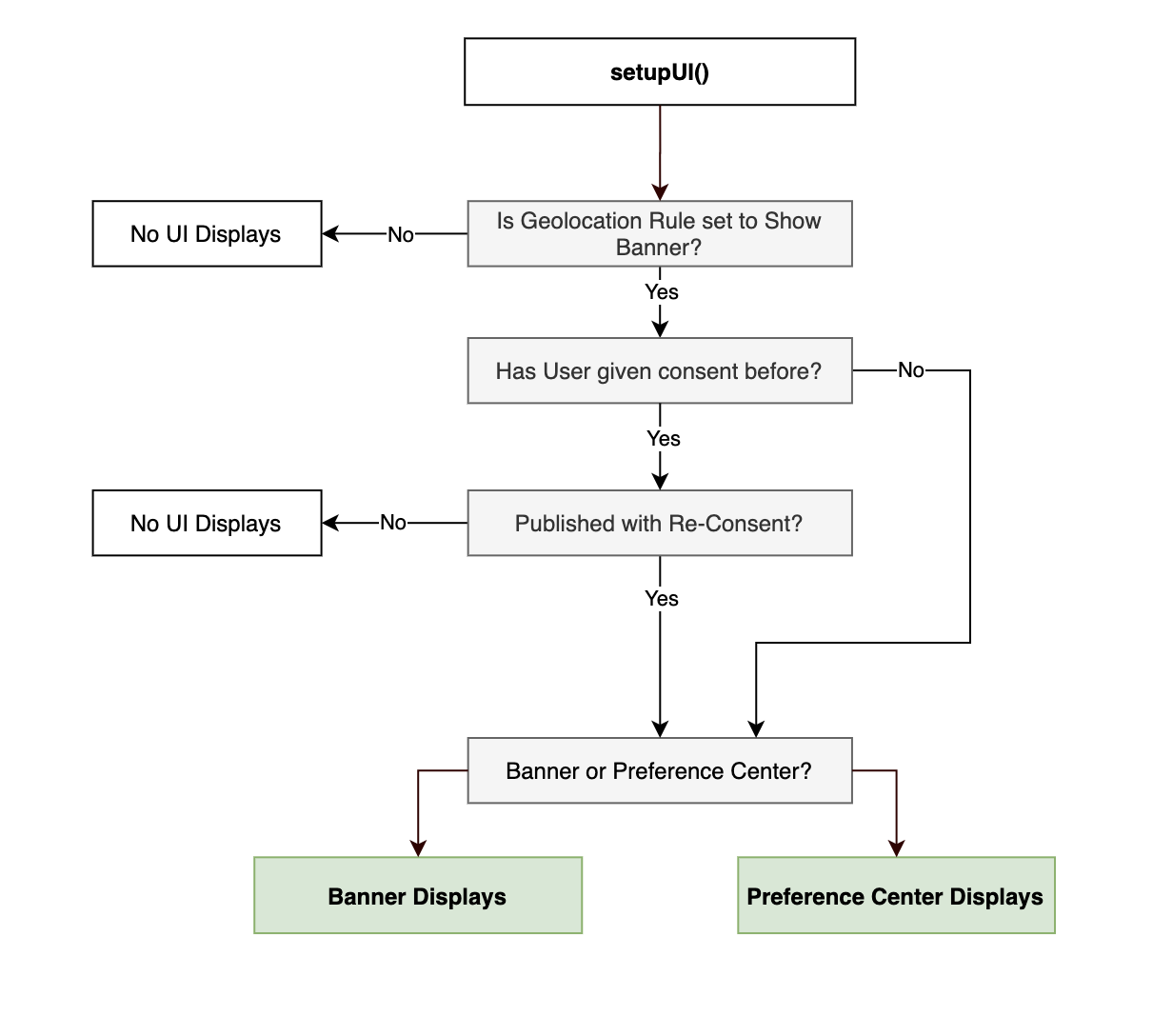
Renders a `Banner` or `Preference Center` UI, after the SDK has been initialized, based on the SDK's `shouldShowBanner` logic.
> If you choose to call showBannerUI or showPrefereneCenterUI, then you will not have to configure or call setupUI with "view" + "type", with type being banner or preference center.
setupUI must be specified in the OTinitialize.brs file before calling to show Banner or Preference Center UI.
Once we have declared the setupUI method(s), this will call and load any setup view/type, or the specific showBannerUI or showPreferenceUI method, and then check for any initialized SDK data.
If it detects any downloaded SDK data, it will load the Banner or Preference Center according to the show methods.
If the SDK data is not downloaded, it will wait until it is downloaded before loading the Banner or Preference Center, based on the type.
> If the type is set as banner but show banner is disabled in the Geolocation Rules in the OneTrust app, then the setupUI method will not show the banner per the consent preference.
The scene.brs also contains several functions for what the OTsdk should do (e.g.,onHideBanner, onButtonSelected, onRowSelected) should perform if marked (true).
> See below for more info on how `shouldShowBanner` gets calculated.
| Param | Description |
| ----- | ------------------------------------------------------------------------------------------------------------------------------------------- |
| type | Either `.banner`, `.preferencecenter`, or `nil`, this determines which UI to display if the `shouldShowBanner` check is computed to `true`. |
```xml
m.global.OTsdk.callFunc("setupUI",{"view":m.top,"type":"banner"})
```
## `showBannerUI`
This method will always show the Banner UI, regardless of `shouldShowBanner` value.
```xml
m.global.Otsdk.callFunc("showBannerUI")
```
> showBannerUI() uses the Controller used by the setupUI() to display the banner. Thus, setupUI() needs to be called before using showBannerUI()
## `showPreferenceCenterUI`
This method will always show the Preference Center UI, regardless of `shouldShowBanner` value.
```xml
m.global.Otsdk.callFunc("showPreferenceCenterUI")
```
> showPreferenceCenterUI() uses the Controller used by the setupUI() to display the banner. Thus, setupUI() needs to be called before using showPreferenceCenterUI()
## `shouldShowBanner`
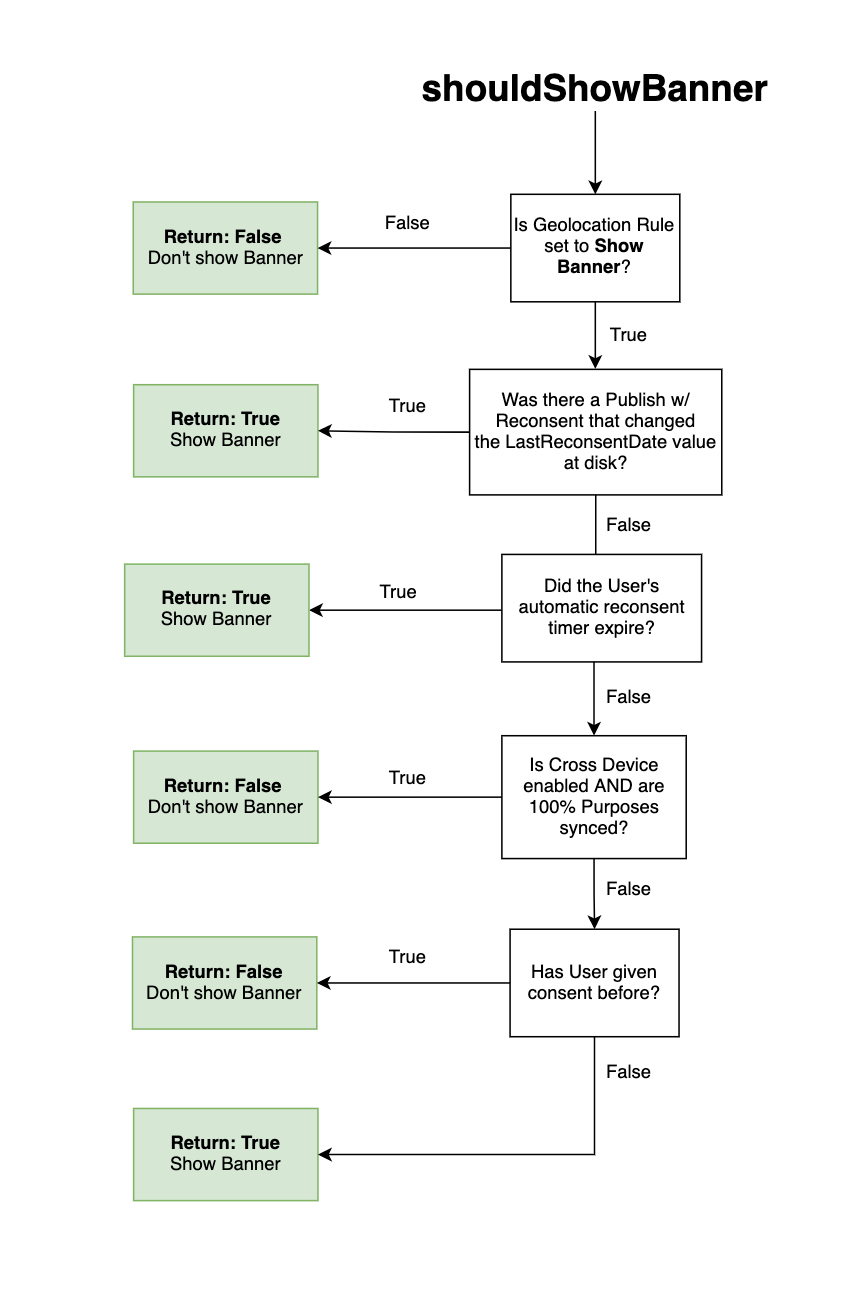
This method determines if the OneTrust Banner needs to be presented to the user or not. The logic tree for computing this value is:
1. Is the `showAlertNotice` property in the JSON set to `true`?
* If no, the method returns `false` because a banner is not meant to be shown for this region.
* If yes, move to the next check.
2. Has the User given/updated their consent before?
* If no, the method returns `true` and a banner should be shown to the user
* If yes, move to the next check.
3. Is the geolocation rule configured for automatic re-consent AND did the user's automatic re-consent timer expire? This is controlled by measuring the difference between `OneTrustLastConsentDate` saved on disk and the `Current Date` and seeing if it is greater than or equal to `OneTrustReconsentFrequencyDays` in the JSON saved on disk. The SDK considers the date itself and not the time consent was given. For example, if the re-consent period is set to 1 day in my geolocation rule and the user provides consent at 11:59pm GMT, the banner will reappear at 12:00am GMT (1 minute later, but the next day).
* If yes, the method returns true and a banner should be shown.
* If no, move to the next check
4. Did the most recent Publish from OneTrust ask User to re-consent?
* If yes, the method returns `true` because the User is being asked to re-consent.
* If no, the method returns `false` because the User has already given prior consent and is not being asked to re-consent.
> **Note:** If you are using OneTrust's pre-built UI, it is likely you won't need to call this method, but good to know how it works as it is decides the outcome of `setupUI` method.
>
> **Note:** If you are building your own UI (BYOUI), then the method below will likely be part of your implementation.
```xml
m.global.Otsdk.callFunc("shouldShowBanner")
```
## `isBannerShown`
This method is used, in some implementations, where the application needs to ***hide*** a "Privacy Settings" application tab or ***prevent*** a user from accessing the Preference Center before they have seen the Banner notice at least once.
The logic for computing this value is:
* Returns `-1` when the SDK has not been intialized yet
* Returns `0` when a Banner / Preference Center has never been shown
* Returns `1` when a Banner / Preference Center has been shown
* Returns `2` when the Banner / Preference Center has never been shown, but the User Profile was synced automatically (only applicable for implementations using Cross Device profile syncing).
For most implementations, the application logic can be:
* If the value returned is *greater than* 0, then show "Privacy Settings" or some link to show a Preference Center.
```xml
m.global.Otsdk.callFunc("isBannerShown")
```