> ## Documentation Index
> Fetch the complete documentation index at: https://developer.onetrust.com/llms.txt
> Use this file to discover all available pages before exploring further.
# Display User Interfaces
# Overview
The OneTrust SDK manages several different user interfaces to display to a user.
[block:parameters]
{
"data": {
"h-0": "Name",
"h-1": "Description",
"h-2": "Public APIs",
"0-0": "Banner",
"0-1": "Notice to the user of their privacy rights. Has configurable text and buttons for **Accept All**, **Reject All**, **Manage Preferences**, and **Close Banner**.
📘** Note**
Each of these buttons can be toggled on/off in the Admin Console.",
"0-2": "`setupUI()`
`showBannerUI()`",
"1-0": "Preference Center",
"1-1": "An interface for the user to view their current profile settings and update their choices based on the configuration provided for them. It has configurable text and buttons for **Accept All**, **Reject All**, **Save Settings**, and **Close Preference Center**.
📘** Note**
You can choose to hide each button except **Save Settings**. This is required for a user to update their choices.",
"1-2": "`setupUI()`
`showPreferenceCenterUI()`",
"2-0": "Purpose Details",
"2-1": "The Purpose Details (or Category Details) view shows granular detail about the category and also shows the **SDK List** link, **Vendor List** link, and child categories based on configuration.",
"2-2": "No public APIs, it can be navigated to from Preference Center by selecting a purpose.",
"3-0": "SDK List",
"3-1": "An interface to show a granular list of SDKs to the user. This list may be filtered by category to provide more transparency to the user.
📘** Note**
This can be hidden in **Template Settings** in the Admin Console.",
"3-2": "No public APIs, it can be navigated to from Preference Center by selecting SDK List or by going to Purpose Details UI and then selecting List of Cookies under individual purposes.",
"4-0": "IAB Vendor List",
"4-1": "An interface, shown only for `IAB2` type templates. Displays a list of third-party ad tech vendors under management by the application. This provides a way for users to opt in/out of consent for a particular vendor.",
"4-2": "No public APIs, it can be navigated to from Banner, Preference Center, and Purpose Details.",
"5-0": "Vendor Details",
"5-1": "A child interface of Vendor List, this view shows more granular information about a vendor and its Purpose, Legitimate Interest, Special Feature, and Special Purpose settings.",
"5-2": "No public APIs, it can be navigated to from Vendor List by selecting an individual vendor."
},
"cols": 3,
"rows": 6,
"align": [
null,
null,
null
]
}
[/block]
## setupUI
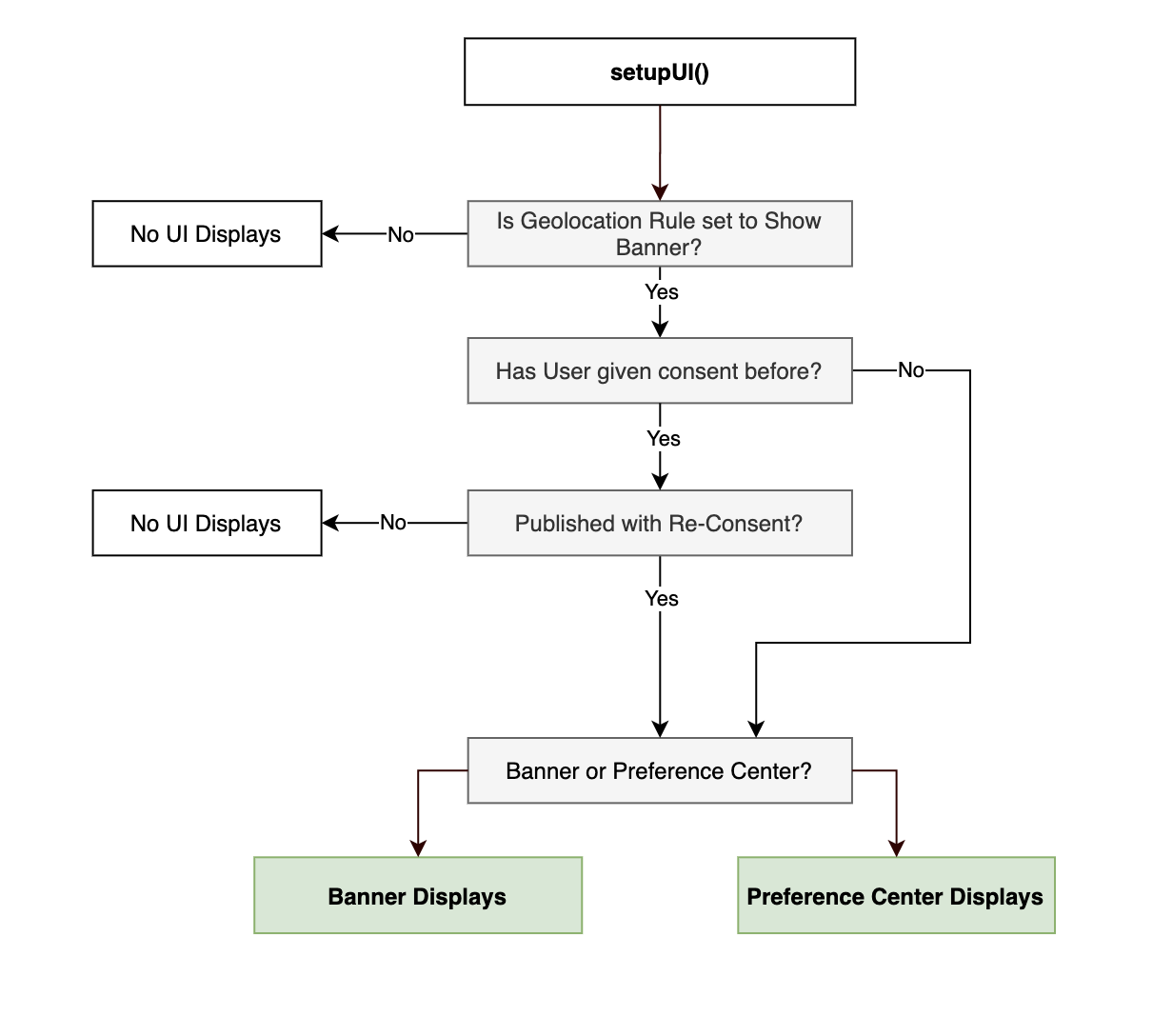
The SDK provides the capability to determine if the OneTrust Banner or Preference Center UI needs to be shown once it retrieves, parses and saves the data from the server as part of the `startSDK()` call.
### setupUI("view", "type")
When combined with a `"type"`, `setupUI()` automatically evaluates the [`shouldShowBanner`](#shouldshowbanner) logic to determine whether the specified UI should be shown to users.
[block:parameters]
{
"data": {
"h-0": "Param",
"h-1": "Description",
"0-0": "`view`",
"0-1": "View of the application to present the OneTrust UI",
"1-0": "`type`",
"1-1": "Sets the type of UI to display if the `shouldShowBanner` check computes to `true`.
Options
`banner`: show Banner if true.
`preferencecenter`: show Preference Center if true.
`none`: show nothing."
},
"cols": 2,
"rows": 2,
"align": [
null,
null
]
}
[/block]
**Automatically Show the Banner UI:**
This is commonly used if the app needs to show a banner UI to collect first time consent.
```xml BrightScript
m.global.OTsdk.callFunc("setupUI", {"view": m.top, "type": "banner"})
```
**Automatically Show the Preference Center UI:**
This is a less common occurrence as the Preference Center UI is usually explicitly surfaced by the user.
```swift BrightScript
m.global.OTsdk.callFunc("setupUI", {"view": m.top, "type": "preferencecenter"})
```
**Don't Show Any UI Automatically**
If you don't want any of the UIs to be surfaced automatically (if applicable), *only* pass in the `view`. Even if the app does not want to automatically surface UIs, this method still needs to be called ahead of `showBannerUI` or `showPreferenceCenterUI`.
```swift BrightScript
m.global.OTsdk.callFunc("setupUI", { "view": m.top })
```
 > 📘 Recommended Approaches
>
> For more information, see [Recommended Approaches Based on Regulatory Use Case](#recommended-approaches-based-on-regulatory-use-case).
> 📘 Recommended Approaches
>
> For more information, see [Recommended Approaches Based on Regulatory Use Case](#recommended-approaches-based-on-regulatory-use-case).
## Recommended Approaches Based on Regulatory Use Case
### GDPR / CCPA / CPRA type Implementations with Banner
For implementations that require a banner, there are two approaches you can take to surface the banner.
#### Option 1: shouldShowBanner() + showBannerUI()
This option is recommended for apps that have an involved onboarding process which require you to control when UIs are surfaced from OneTrust.
```swift BrightScript
ssb = m.global.OTsdk.callFunc("shouldShowBanner")
if ssb
m.global.OTsdk.callFunc("setupUI", { "view": m.top })
m.global.OTsdk.callFunc("showBannerUI")
else
` move to the next step
end if
```
#### Option 2: setupUI()
This option is recommended for apps that that can show the OneTrust UI without restriction. When coupled with a `type`, `setupUI()` automatically evaluates the `shouldShowBanner` logic and surfaces the set UI if it evaluates to `true`.
```swift BrightScript
m.global.OTsdk.callFunc("setupUI", {"view": m.top, "type": "banner"})
```
#### Preference Center
In order to give users the ability to change their consent settings at any time, most implementations require a button (usually behind a settings page) in your app that surfaces the Preference Center. This can be accomplished with the `showPreferenceCenterUI()` method. As this method has no conditional logic attached to it, calling it will surface the preference center UI every time.
```Text BrightScript
m.global.OTsdk.callFunc("setupUI", { "view": m.top })
m.global.OTsdk.callFunc("showPreferenceCenterUI")
```
> 📘
>
> Remember to call `setupUI` at least once to pass in your desired view
### CCPA/CPRA type Implementations without Banner
Although no banner UI is used, most implementations require a button (usually behind a settings page) in your app that surfaces the Preference Center in order to give users the ability to change their consent settings at any time. This can be accomplished with `showPreferenceCenterUI()`. As this method has no conditional logic attached to it, calling it will surface the preference center UI every time.
```swift BrightScript
m.global.OTsdk.callFunc("setupUI", { "view": m.top })
m.global.Otsdk.callFunc("showPreferenceCenterUI")
```
> 📘
>
> Remember to call `setupUI` at least once to pass in your desired view
## showBannerUI
This method will always show the Banner UI, regardless of `shouldShowBanner` value.
```xml BrightScript
m.global.OTsdk.callFunc("showBannerUI")
```
> 📘
>
> Remember to call `setupUI` at least once to pass in your desired view
## showPreferenceCenterUI
This method will always show the Preference Center UI, regardless of `shouldShowBanner` value.
```xml BrightScript
m.global.OTsdk.callFunc("showPreferenceCenterUI")
```
> 📘
>
> Remember to call `setupUI` at least once to pass in your desired view
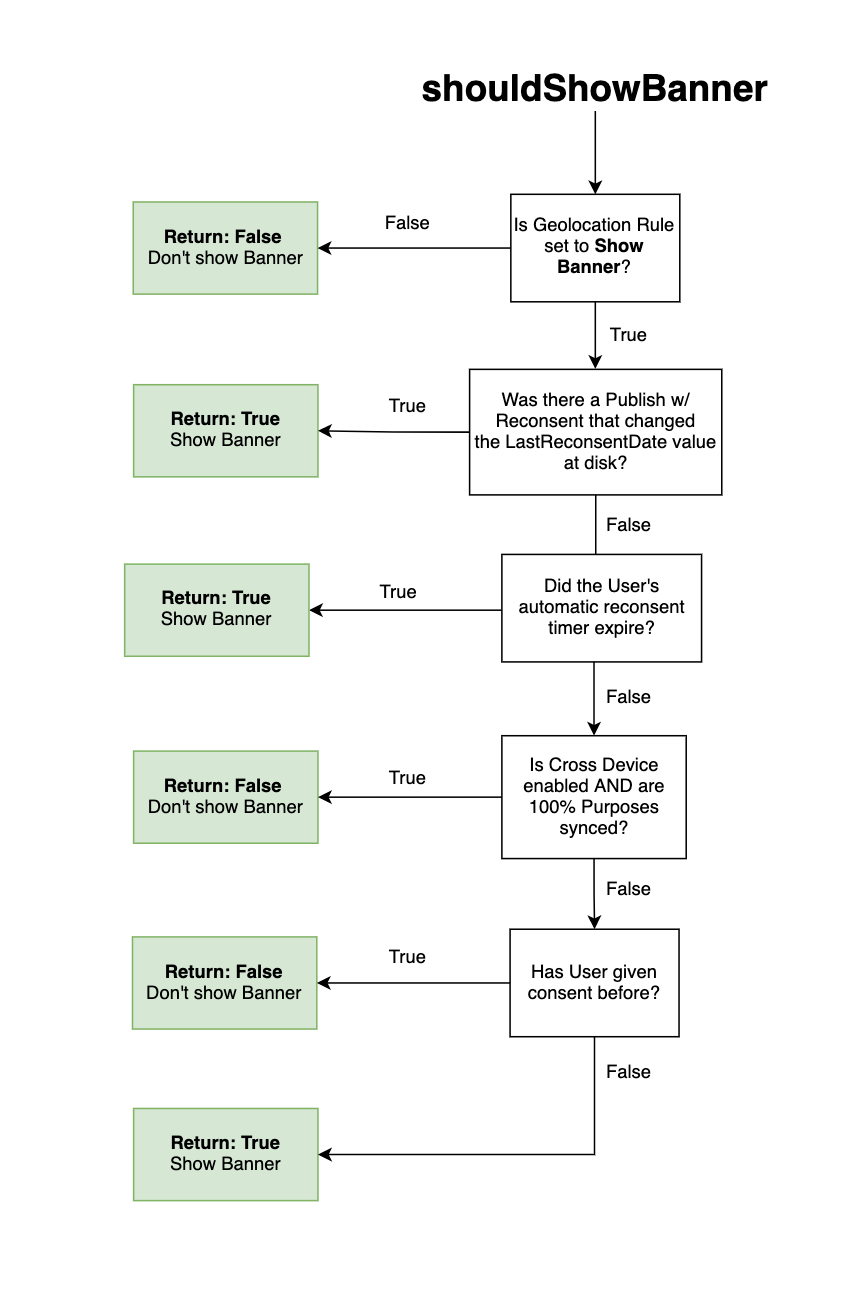
## shouldShowBanner
This method determines if the Banner UI should be displayed to the user.
```xml BrightScript
m.global.OTsdk.callFunc("shouldShowBanner")
```
### How **shouldShowBanner** is computed
1. **Is the geolocation rule configured to show a banner?** This is controlled by the `showAlertNotice` property in the JSON being `true`.
* If `showAlertNotice = false`, the method returns `false` and a banner should not be shown for this region.
* If `showAlertNotice = true`, move to the next check.
2. **Was the most recent SDK Publish configured to re-consent users?** This is controlled by the presence of 2 values. 1) A `LastReconsentDate` property in JSON with non-null value. 2) A `OneTrustLastReconsentDate` value saved on disk.
* If the `LastReconsentDate` JSON is *newer than* the `OneTrustLastReconsentDate` on disk, the method returns `true` and a banner should be shown.
* If no, move to the next check.
3. **Is the geolocation rule configured for automatic re-consent AND did the user's automatic re-consent timer expire?** This is controlled by measuring the difference between `OneTrustLastConsentDate` saved on disk and the `Current Date` and seeing if it is greater than or equal to `OneTrustReconsentFrequencyDays` in the JSON saved on disk. The SDK considers the date itself and not the time consent was given. For example, if the re-consent period is set to 1 day in my geolocation rule and the user provides consent at 11:59pm GMT, the banner will reappear at 12:00am GMT (1 minute later, but the next day).
* If yes, the method returns `true` and a banner should be shown.
* If no, move to the next check.
4. **Is Cross Device Consent enabled and were 100% of Purposes synced?** This is controlled by the `profile.sync.allPurposesUpdatedAfterSync` property in JSON being `true`.
* If yes, the method returns `false` and a banner should not be shown. This is because each of the Categories/Purposes managed by the SDK were 100% synced from the user's profile on the OneTrust server.
* If no, move to the next check.
5. **Is Cross Device Consent enabled and is the user being exposed to new Categories/Purposes since the last time their consent was saved?** This would only occur if Cross Device Consent is enabled and there was a new publish to the SDK which exposes new Categories/Purposes that have at least 1 SDK assigned to it.
* If yes, the method returns `true` and a banner should be shown.
* If no, move to the next check.
6. **Has the user previously given consent and is that consent stored at disk?**
* If yes, the method returns `false` and a banner should not be shown.
* If no, the method returns `true` and a banner should be shown because this is the first time they are being asked to give consent on the app.
7. **Has a new category been added after giving consent?**
* If yes, the method returns `true `and a banner should be shown again because user needs to give consent to the new category.
* If no, the method returns `false` and a banner should not be shown.
 ## isBannerShown
This method determines if the Banner or Preference Center UI has already been shown to the user.
This is commonly used in cases where the application needs to hide or prevent a user from accessing the Preference Center UI button before they have seen the Banner UI at least once.
**Returns:**
* `-1` if the SDK has not been initialized at least once
* `0` when the Banner or Preference Center UI has never been shown
* `1` when a Banner or Preference Center UI has been shown
* `2` when the Banner or Preference Center UI has never been shown, but the cross device profile was synced automatically (only applicable for implementations using Cross Device Consent)
```xml BrightScript
m.global.OTsdk.callFunc("isBannerShown")
```
## isBannerShown
This method determines if the Banner or Preference Center UI has already been shown to the user.
This is commonly used in cases where the application needs to hide or prevent a user from accessing the Preference Center UI button before they have seen the Banner UI at least once.
**Returns:**
* `-1` if the SDK has not been initialized at least once
* `0` when the Banner or Preference Center UI has never been shown
* `1` when a Banner or Preference Center UI has been shown
* `2` when the Banner or Preference Center UI has never been shown, but the cross device profile was synced automatically (only applicable for implementations using Cross Device Consent)
```xml BrightScript
m.global.OTsdk.callFunc("isBannerShown")
```
## FAQ
1. **Are HTML elements (e.g. break tags, bold tags, underline tags, etc.) supported in the SDK UI?**
No, HTML tags or elements are not supported by the Roku SDK UI. These tags will be sanitized so it will not appear as plain text in the UI and it will not be interpreted.