> ## Documentation Index
> Fetch the complete documentation index at: https://developer.onetrust.com/llms.txt
> Use this file to discover all available pages before exploring further.
# Initialize SDK
# Overview
The OneTrust SDK retrieves and saves all the data needed to display the CMP UI and collect consent for the purposes, vendors and SDKs used by the application. The data returned is determined by the configurations made in the OneTrust Admin console.
> Before the SDK can be successfully initialized, ensure that the appropriate SDK data version has been published in the OneTrust tenant/admin console. If it has not been published, there will be no data to retrieve. [View instructions on how to publish here.](https://developer.onetrust.com/onetrust/docs/publish-changes)
## `startSDK`
> 📘
>
> **Note:** As of 6.15.0, the `initOTSDKData()` method is deprecated and should be replaced with `startSDK()`. You can read more about the reasons why [here](https://developer.onetrust.com/onetrust/docs/api-reference-ios-tvos#initotsdkdata).
This method is the initialization method for the SDK. It makes between 1-2 network calls:
* 1 network call when using a non-IAB TCF2 implementations
* 2 networks calls when using a IAB TCF2 template
```swift
// Swift
OTPublishersHeadlessSDK.shared.startSDK(
storageLocation: "cdn.cookielaw.org",
domainIdentifier: "3598fb78-0000-1111-2222-83ee558d6e87",
languageCode: "en",
params: sdkParams,
loadOffline: false
) { response in
print("status: \(response.status)")
print("result: \(response.responseString ?? "")")
print("error: \(response.error ?? "")")
// Take next action...
}
// ObjC
[OTPublishersHeadlessSDK shared]
[startSDKWithStorageLocation: @"cdn.cookielaw.org"];
[domainIdentifier: @"3598fb78-0000-1111-2222-83ee558d6e87"];
[languageCode:@"en"];
[params: sdkParams];
[completionHandler:^(OTResponse *response)]; {
[NSLog(@"OTT Data fetch status: %d, result: %@ and error: %@", response.status, response.responseString, response.error)];
// Take next action...
}
```
> 👍 Successful initialization
>
> After the SDK is successfully initialized at least once, it caches the data locally on the device. If the initialization fails the next time around, users will still be able to access the CMP UI and make consent choices.
### Parameters
[block:parameters]
{
"data": {
"h-0": "Parameter",
"h-1": "Description",
"h-2": "Required",
"0-0": "`storageLocation`",
"0-1": "The CDN location for the JSON that the SDK fetches. (Usually, but not always, `cdn.cookielaw.org`.",
"0-2": "Yes",
"1-0": "`domainIdentifier`",
"1-1": "The Application guid (retrieved from OneTrust Admin console)",
"1-2": "Yes",
"2-0": "`languageCode`",
"2-1": "2-digit or 4-digit (in the case of advanced languages) ISO language code used to return content in a specific langauge.
**Note:** Any language code format which is not listed in OneTrust environment will be considered as invalid input.
**Note:** If the languageCode passed by your application is valid, but does not match with a language configuration for your template, then the SDK will return content in the default language configured in OneTrust environment (usually, but not always, English).",
"2-2": "Yes",
"3-0": "`params`",
"3-1": "A parameter of type `OTSDKParams` which contains other optional SDK params. See below for more details.",
"3-2": "No",
"4-0": "`loadOffline`",
"4-1": "Set to true to load [Offline Mode](https://developer.onetrust.com/onetrust/docs/initialize-the-sdk-ios-tvos#setotofflinedata) data.",
"4-2": "No",
"5-0": "`OTCallback`",
"5-1": "A callback that fires once the SDK's fetch process completes.",
"5-2": "Yes"
},
"cols": 3,
"rows": 6,
"align": [
null,
null,
null
]
}
[/block]
### Response Object
This is the return of the `startSDK()` method. It is `OTResponse` type.
| Field | Description | Type |
| -------------- | --------------------------------------------------------------------- | -------- |
| status | Represents if the OT SDK data download call was successful or not. | `Bool` |
| responseString | Represents the entire server response received while starting OT SDK. | `String` |
| error | Represents any error that has occurred while starting OT SDK. | `Error` |
### What should the `storageLocation` value be?
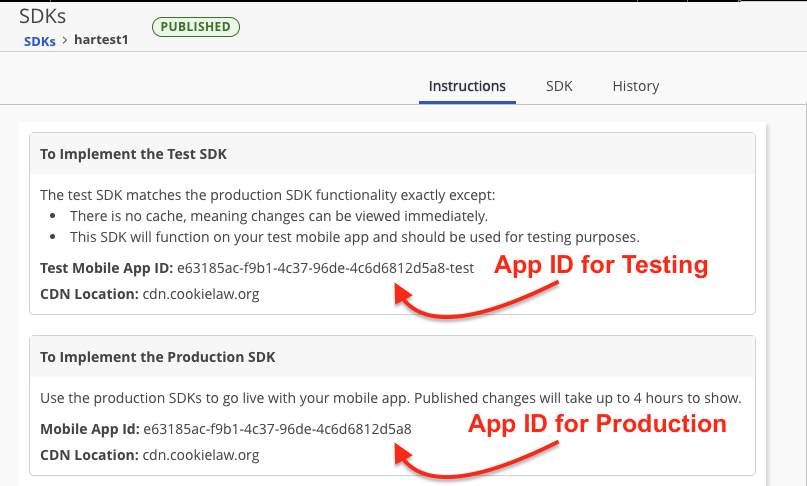
The `storageLocation` paramter is the `CDN Location` value which you retrieve from the OneTrust Admin under \*\*SDKs > {Select App from List} > Instructions \*\* (pictured below). This value is OneTrust environment dependent and the potential values can also be found using the [Location header](https://developer.onetrust.com/onetrust/reference/applicationdata#location-header) table on the Mobile App Data API reference.
### What should the `domainIdentifier` value be?
The `domainIdentifier` parameter is the `Mobile App ID` value which you retrieve from the OneTrust Admin under **SDKs > {Select App from List} > Instructions** (pictured below).
## `OTSDKParams`
```swift
// Swift
// Note: All of these params are optional.
let sdkParams = OTSdkParams(countryCode: "US", regionCode: "CA")
sdkParams.setShouldCreateProfile("false")
// profileSyncParams explained below
sdkParams.setProfileSyncParams(profileSyncParam)
// ObjC
// Note: All of these params are optional.
OTSdkParams *sdkParams = [[OTSdkParams alloc]initWithCountryCode:@"US" regionCode:@"CA"];
[sdkParams setShouldCreateProfile: true];
[sdkParams setBannerHeightRatio: OTBannerHeightRatioTwo_third];
// profileSyncParams explained below
[sdkParams setProfileSyncParams: profileSyncParam];
```
[block:parameters]
{
"data": {
"h-0": "Parameter",
"h-1": "Description",
"h-2": "Release Version",
"0-0": "`countryCode`",
"0-1": "Two-letter ISO 3166-2 country code. This can be used to bypass the automatic geo-ip lookup performed by the SDK.",
"0-2": "6.4.0",
"1-0": "`regionCode`",
"1-1": "Two-letter state code, used alongside countryCode, typically used for CCPA use cases when providing an experience for California-based US citizens.",
"1-2": "6.4.0",
"2-0": "`setShouldCreateProfile`",
"2-1": "When set to `\"true\"`, this will tell the SDK to create a Data Subject Profile in the Universal Consent module.
**Note:** This should only be used for applications utilizing the Cross Device Consent functionality. Please contact your OneTrust Consultant for more information on this feature.",
"2-2": "6.5.0"
},
"cols": 3,
"rows": 3,
"align": [
null,
null,
null
]
}
[/block]
## Passing Custom Geolocation
The OneTrust SDK, by default, determines a country and region code for a User based on a geo-ip lookup when calling `startSDK`. to deliver a certain template. If you choose to perform your own geolocation lookup, this is supported by using the `countryCode` and `regionCode` parameters mentioned above.
## Retrieving User Location
The SDK returns the location where data was last downloaded and can be used to determine user location. Returns a string.
```swift
let userLocation = OTPublishersHeadlessSDK.shared.getLastDataDownloadedLocation()
print("User Country: \(userLocation.country), User State: \(userLocation.state)")
```
The SDK returns the location where the user last interacted with the SDK UI and provided consent. Returns a string.
```swift
let consentedLocation = OTPublishersHeadlessSDK.shared.getLastUserConsentedLocation()
print("User Country: \(consentedLocation?.country), User State: \(consentedLocation?.state)")
```
## Configuring Banner Height
By default, the OneTrust SDK renders the Banner in full screen. You can update this to instead be `Two-thirds`, `Half`, or `One-third` depending on preference.
**Recommended Way:** OneTrust recommends configuring the Banner Height from the OneTrust Admin via **Templates > Mobile App > Banner > General**. This way it can be updated via **Publish** instead of being hard-coded to the application and require a version update to App Stores.
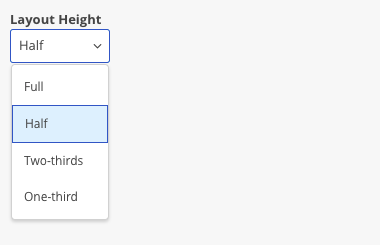
**Legacy Way:** Set the `OTBannerHeightRatio` parameter to either `.two_third`, `.one_half`, or `one_third`.
## `setOTOfflineData() `
As of 6.38.0, we have introduced an offline data mode which can be used to initialize the OneTrust SDK offline. This function is an instance of the OTOfflineData Object.
If the loadOffline parameter is passed as `false` and there is no internet connectivity while making the network call to OneTrust, the OneTrust SDK will try using the offline data that is set up using `OTPublishersHeadlessSDK.shared.setOTOfflineData(\_:)`. If no data is available, the SDK will fail to initialize.
If the loadOffline parameter is passed as `true`, the SDK will only use the offline data set up using `OTPublishersHeadlessSDK.shared.setOTOfflineData(\_:)`. If no data is available, the SDK will fail to initialize.
In order to retrieve the JSON needed for offline mode, you will have to fetch the data using our mobile data endpoint: .
> 📘 Note
>
> The endpoints below are only needed if your app is using IAB TCF Framework. If you're not using Google Additional Vendors, disregard the Google endpoint.
* IAB TCF Vendor List Endpoint:
* Google Vendor List Endpoint:
After retrieving the JSON specific to your App ID, you'll supply this to the SDK.
### Non-IAB TCF
**Use the code below for a standard GDPR, CCPA and IAB CCPA implementation:**
```swift
func setupOTOfflineData() -> Bool {
func getJSONData(for fileName: String) -> Data? {
guard let path = Bundle.main.path(forResource: fileName, ofType: "json") else{
return nil
}
guard let jsonData = try? Data(contentsOf: URL(fileURLWithPath: path)) else{
return nil
}
return jsonData
}
guard let otData = getJSONData(for: "OneTrustData"), !otData.isEmptyelse{ return false}
// For non-IAB implementations, declare vendorData and pass in nil for the iab and google parameters.
let vendorData = OTOfflineData.VendorListData(iab: nil, google: nil)
// Setting up the offline data for loading logos in offline mode.
// Note: if you are not using any of the below logos, please pass in nil inside the parameter.
let logoData = OTOfflineData.LogoData(bannerLogo: UIImage(named: "filename"),
pcLogo: UIImage(named: "filename"),
ageGateLogo: UIImage(named: "filename"),
attLogo: nil)
// Setting up the offline data required for setting up OT SDK in offline mode.
let offlineData = OTOfflineData(otData: otData, vendorListData: vendorData, logoData: logoData)
OTPublishersHeadlessSDK.shared.setOTOfflineData(offlineData)
return true
}
// Must call setupOTOfflineData() first before startSDK()
setupOTOfflineData()
startSDK()
```
### IAB TCF
**Use the code below for an IAB TCF 2.0 Implementation:**
```swift
func setupOTOfflineData() -> Bool {
func getJSONData(for fileName: String) -> Data? {
guard let path = Bundle.main.path(forResource: fileName, ofType: "json") else{
return nil
}
guard let jsonData = try? Data(contentsOf: URL(fileURLWithPath: path)) else{
return nil
}
return jsonData
}
guard let otData = getJSONData(for: "OneTrustData"), !otData.isEmptyelse{ return false}
let iabData = getJSONData(for: "iabJSONFile")
let googleData = getJSONData(for: "googleVendorJSONFile")
// Setting up the offline data for vendors(IAB and Google) for showing vendor data in offline mode.
let vendorData = OTOfflineData.VendorListData(iab: iabData, google: googleData)
// Setting up the offline data for loading logos in offline mode.
// Note: if you are not using any of the below logos, please pass in nil inside the parameter.
let logoData = OTOfflineData.LogoData(bannerLogo: UIImage(named: "filename"),
pcLogo: UIImage(named: "filename"),
ageGateLogo: UIImage(named: "filename"),
attLogo: nil)
// Setting up the offline data required for setting up OT SDK in offline mode.
let offlineData = OTOfflineData(otData: otData, vendorListData: vendorData, logoData: logoData)
OTPublishersHeadlessSDK.shared.setOTOfflineData(offlineData)
return true
}
// Must call setupOTOfflineData() first before startSDK()
setupOTOfflineData()
startSDK()
```
**Note:** Currently setupOTOfflineData() will only work for one JSON at a time, which means we can only support one geolocation rule and one language.
## Capture Records of Consent
When a user gives consent, the SDK automatically saves the consent profile *locally* to disk. This is so a User's settings can be reflected in the Preference Center UI without having to make a network call.
Optionally, a user's consent can be saved to OneTrust servers, this feature is known as **Capture Records of Consent** and is enabled in the **Geolocation Rules** section of OneTrust Admin, not on the SDK locally.
Enabling **Capture Records of Consent** is the only way to feed OneTrust Reports and Dashboards, otherwise the consent data is only kept locally on the device.
## Creating Data Subject Profiles
The SDK has the ability to display and manage consent for Universal Consent Purposes, and not just Cookie Categories. For this feature to work, the developer needs to call `setShouldCreateProfile(true)`method on the `SDKParams` config object.
If this is not done, then the server will only create *Consent Receipts* instead of also creating *Data Subject Profiles* when a user updates their choices.
## Cross Device Consent
Cross Device Consent is an optional feature. These parameters are **not required** for initializing the SDK to fetch and display Banners and Preference Centers to users.
That said, if you are enabling the Cross Device Consent functionality, each of these `OTProfileSyncParams` are required to be passed to the `startSDK()` method to sync user profile data with the latest values on OneTrust servers. More information about the requirements for the JWT that is passed as `syncProfileAuth` can be found in the following article: [Cross Domain and Cross Device Consent](https://developer.onetrust.com/onetrust/docs/cross-domain-cross-device).
```swift
// Swift
let profileSyncParam = OTProfileSyncParams()
profileSyncParam.setSyncProfile("true")
profileSyncParam.setSyncProfileAuth("JWT token")
profileSyncParam.setIdentifier("userId")
profileSyncParam.setIdentifierType("identifierType")
// ObjC
OTProfileSyncParams *profileSyncParam = [[OTProfileSyncParams alloc] init];
[profileSyncParam setSyncProfile:@"true"];
[profileSyncParam setSyncProfileAuth:@"JWT token"];
[profileSyncParam setIdentifier:@"userId"];
```
| Parameter | Description | Required for Cross Device |
| -------------------- | -------------------------------------------------------------------------------- | --------------------------------------- |
| `setSyncProfile` | Tells `startSDK` to attempt Cross Device Consent profile syncing. | Yes |
| `setSyncProfileAuth` | Use this to pass the pre-signed JWT auth token required to perform Cross Device. | Yes |
| `setIdentifier` | Sets the identifier value used to create a user profile server-side. | Yes |
| `setIdentifierType` | Sets the identifier type for Unified Profile | No, only when Unified Profile is in use |
> 📘
>
> Ensure that you're also setting `setShouldCreateProfile("true")`to true in `OTSDKParams` so a user profile is created on OneTrust servers.
## Cross Device Consent Workflow
Please reference this article for Best Practices for Cross Device Consent: [Cross Domain and Cross Device Consent](https://developer.onetrust.com/onetrust/docs/cross-domain-cross-device).
You can reference the following article for Implementation guidance on moving from Anonymous to known state: [Override Server Consent - Anonymous to Known State](https://developer.onetrust.com/onetrust/docs/cross-domain-cross-device#override-server-consent).