
Age-Based Consent- CMP API
This page provides context on how to implement an age-based consent solution for the OneTrust server side CMP API solutions
1. Overview
Age-Based Consent (also called "Age Gate") enables automatic consent enforcement based on a user's age range. Administrators configure age range groups (e.g., 0-13, 14-17, 18+) in the OneTrust admin console and link them to specific purposes or purpose groups. When a user falls within a restricted age range, consent for the linked purposes is automatically denied and cannot be overridden.
How It Works (CMP API Direct)
- Administrators configure restricted age range groups in the OneTrust admin console and link purposes or purpose groups to them.
- Your application collects the user's age range from your own user profile system.
- Your application sends the age range to the CMP API via the
save-log-consentendpoint with theAGEGATE_RANGEinteraction type. - The CMP API evaluates the age range against the configured restrictions and returns updated consent data.
- Your application processes the response and renders the consent UI accordingly (disabled toggles, denied consent).
Key Concepts
| Concept | Description |
|---|---|
| Age Range | A lower and upper bound representing the user's age (e.g., 13-17). Both bounds are optional. To represent "18+" (adults), set lowerBound = 18 and omit upperBound. |
| Restricted Age Group | An age range configured in the admin console and linked to one or more purposes. Users whose age range overlaps are restricted. |
| Restricted Purpose | A purpose linked to an age group. When the user is restricted, consent is denied and the toggle should be disabled. |
AGEGATE_RANGE | The CMP API interaction type used to log and enforce age-based consent restrictions. |
What Age-Based Consent Does NOT Do
- It does not determine the user's age. Your application must provide this data.
- It does not render UI. Your application is responsible for rendering the consent UI based on the CMP API response.
- It does not enforce restrictions client-side. The CMP API is the authoritative enforcement point. Your application must respect the response fields.
2. Prerequisites
Before implementing Age-Based Consent with the CMP API, make sure the following are in place.
Admin Console Configuration
- Age range groups are configured in the OneTrust admin console (under the Age Gate section).
- Purpose groups or categories are linked to the appropriate age range groups.
- The Age Gate feature flag is enabled for your organization.
CMP API Access
- You have a valid OneTrust application ID (
OT-App-Id). - You have access to the CMP API endpoints (
/cfw/cmp/v1/save-log-consent, etc.). - You are familiar with the CMP API request/response format.
Age Gate Prompt Is Not Required
Age range enforcement works independently of the Age Gate prompt. You do not need to configure or use the prompt UI to use age range-based enforcement.
If you already have an age signal from your application (for example, from user registration or login), you can use it directly.
3. Implementation
Step 1: Send the Age Range via save-log-consent
To log the user's age range and trigger enforcement, send a POST request to the save-log-consent endpoint with the AGEGATE_RANGE interaction type.
Request
POST /cfw/cmp/v1/save-log-consent
Required Headers
| Header | Value | Description |
|---|---|---|
OT-App-Id | your-app-id | Your OneTrust application identifier |
OT-SDK-Version | 202610.1.0 (or latest) | Version string (use the latest) |
OT-Language | en | Language code |
OT-CDN-Location | cdn.cookielaw\.org | CDN location |
OT-Consent-String | <base64-encoded-consent-string> | The current OT consent string for the user |
OT-Platform | Android / iOS / web | Platform identifier |
OT-Force-Fetch | true | Force a fresh response |
Content-Type | application/json |
Note: If applicable, also include the OT-Tcf-Eu2v2-Consent-String and OT-GPP-String headers with the current TC and GPP strings.
Request Body
{
  "interactionType": "AGEGATE_RANGE",
  "userAgent": "MyApp/1.0 iOS/18.0",
  "ageGate": {
    "lowerBound": 13,
    "upperBound": 17
  }
}
ageGate Object Fields
| Field | Type | Required | Description |
|---|---|---|---|
lowerBound | Integer | Optional | The lower bound of the user's age range (0-255). Omit or set to 0 if not applicable. |
upperBound | Integer | Optional | The upper bound of the user's age range (0-255). Omit for open-ended ranges (e.g., 18+). |
Examples
// User aged 13-17
{ "lowerBound": 13, "upperBound": 17 }

// User aged 18+ (open-ended)
{ "lowerBound": 18 }

// User aged 0-12 (no lower bound specified)
{ "upperBound": 12 }
Full cURL Example
curl -X POST 'https://mobile-data.onetrust.io/cfw/cmp/v1/save-log-consent' \
-H 'OT-App-Id: YOUR-APP-ID' \
-H 'OT-SDK-Version: 202610.1.0' \
-H 'OT-Language: en' \
-H 'OT-CDN-Location: cdn.cookielaw\.org' \
-H 'OT-Consent-String: <base64-encoded-consent-string>' \
-H 'OT-Platform: iOS' \
-H 'OT-Force-Fetch: true' \
-H 'Content-Type: application/json' \
-d '{
  "interactionType": "AGEGATE_RANGE",
  "userAgent": "MyApp/1.0 iOS/18.0",
  "ageGate": {
    "lowerBound": 13,
    "upperBound": 17
  }
}'
Step 2: Process the Response
The CMP API response includes updated purpose tree data with age-based restrictions applied.
Key Response Fields to Check
For each purpose/group in the response's purpose tree, check:
| Field | Value | Meaning |
|---|---|---|
consentToggleStatus | 0 or 1 | Normal toggle -- show and allow interaction |
consentToggleStatus | 2 | Always Active -- show as always active |
consentToggleStatus | -1 | Restricted -- toggle is restricted (see below for interpretation) |
isConsentDisabled | true | Consent toggle is disabled due to Age Gate |
isLegIntDisabled | true | Legitimate Interest toggle is disabled due to Age Gate |
consentStatus | 0 | Consent is denied (forced by Age Gate) |
How to Interpret -1 with isConsentDisabled
-1 with isConsentDisabledThis is critical for correct UI rendering:
- If
consentToggleStatus == -1andisConsentDisabled == true: Age Gate restricted. Show the toggle in a disabled/grayed-out state, set to OFF. The user should see the purpose but cannot change its consent state. - If
consentToggleStatus == -1andisConsentDisabled == false(or absent): Hidden for a non-Age Gate reason (e.g., purpose configuration). Hide the toggle entirely from the UI.
Example Response (Relevant Section)
{
  "pcUIData": {
    "purposeTree": {
      "purposes": [
        {
          "groupId": "C0005",
          "groupName": "Social Media Cookies",
          "consentToggleStatus": -1,
          "consentStatus": 0,
          "isConsentDisabled": true,
          "isLegIntDisabled": false,
          "isLinkedCategory": true
        },
        {
          "groupId": "C0004",
          "groupName": "Targeting Cookies",
          "consentToggleStatus": 1,
          "consentStatus": 1,
          "isConsentDisabled": false,
          "isLegIntDisabled": false
        }
      ]
    }
  }
}
In this example, C0005 is Age Gate restricted (disabled toggle, consent denied), while C0004 is normal.
AGEGATE_RANGE Does NOT Update lastConsentDate
An AGEGATE_RANGE interaction is not treated as giving consent. The CMP API retains the existing lastConsentDate value. This means logging an age range alone does not count as the user having given or denied consent.
OT_AgeGate Storage Key
The response's storageKeys section includes an OT_AgeGate field containing the stored age range for the profile:
{
  "storageKeys": {
    "OT_AgeGate": {
      "lastUpdated": 1777323272761,
      "lowerBound": 13,
      "upperBound": 17
    }
  }
}
Use this to confirm the age range the CMP API has registered for the user's profile.
toggleDisableHints in Prompts
The response's prompts.ageGate section includes a toggleDisableHints field containing the admin-configured explanatory text to display alongside disabled toggles:
{
  "prompts": {
    "ageGate": {
      "toggleDisableHints": "This item isn't available for your age range and cannot be enabled.",
      "linkedCategories": { ... }
    }
  }
}
Use this value for the explanatory copy instead of hardcoding it -- the admin can customize the text per deployment.
Updated Consent Strings
The response also includes correctly recomputed consent strings in the storageKeys section:
| String | Field | Notes |
|---|---|---|
| TC String | tcString in storageKeys | Re-encoded with restricted purposes reflected as denied |
| GPP String | gppString in storageKeys | Re-encoded based on the current consent state with restrictions applied |
| US Privacy String | IABUSPrivacy_String in storageKeys | Generated based on the current consent state with Age Gate applied |
Important: Consent strings are recomputed using the final consent state of each purpose. Since restricted purposes have their consent set to denied, the strings accurately reflect this. Always use the consent strings from the response -- do not recompute them client-side.
Step 3: Render Restrictions in Your UI
Based on the response, update your consent UI:
For Age Gate restricted purposes (consentToggleStatus == -1 and isConsentDisabled == true):
- Show the purpose in the preference center -- do not hide it.
- Show the consent toggle in a disabled (grayed-out) state, set to OFF.
- Display the explanatory message from the
toggleDisableHintsfield (inprompts.ageGate) when the user views the purpose details. The default text is: "This item isn't available for your age range and cannot be enabled." but this can be customized by the admin. - Block any programmatic consent updates for restricted purposes.
- Report consent as denied (
0) for restricted purposes in all consent APIs and callbacks.
For non-restricted purposes: render and handle them normally.
For Legitimate Interest: If isLegIntDisabled == true, apply the same disabled treatment to the LI toggle for that purpose.
Always Active purposes are exempt: Purposes configured as "Always Active" (consentToggleStatus == 2) are never restricted by Age Gate, even if they are linked to a restricted age group. The Always Active status takes priority over Age Gate restrictions.
When to Send an AGEGATE_RANGE Request
| Scenario | Action |
|---|---|
| User logs in / creates account | Send AGEGATE_RANGE with the user's age range |
| User updates their profile (age changes) | Send AGEGATE_RANGE with the updated age range |
| User switches accounts | Send AGEGATE_RANGE with the new user's age range |
| First consent collection (no prior age range) | Send AGEGATE_RANGE before or alongside the banner interaction |
| Age range has not changed since last request | No action needed -- do not resend |
4. Data Model Reference
ageGate Object
ageGate Object
The JSON object representing the user's age range, sent in the save-log-consent request body.
Properties
- lowerBound (Integer, 0-255, Optional): Minimum age in the range. If omitted, treated as 0 (i.e., from birth).
- upperBound (Integer, 0-255, Optional): Maximum age in the range. If omitted, treated as open-ended (i.e., no upper limit).
Valid Examples
- Child (0-12):
{ "upperBound": 12 }. Ages 0 through 12. - Teen (13-17):
{ "lowerBound": 13, "upperBound": 17 }. Ages 13 through 17. - Adult (18+):
{ "lowerBound": 18 }. Ages 18 and above (open-ended). - Exact range:
{ "lowerBound": 25, "upperBound": 34 }. Ages 25 through 34.
Invalid Examples
- Empty object:
{}. No bounds provided. At least one bound is required. - Inverted:
{ "lowerBound": 25, "upperBound": 18 }. Upper must be greater than or equal to lower.
Note: Equal bounds (e.g., { "lowerBound": 18, "upperBound": 18 }) are valid and represent a single-age range.
Age Range Persistence
Once a profile is registered with an age range via an AGEGATE_RANGE request, that age range stays associated with the profile on the CMP API. Even if a subsequent request sends null/empty values for both lowerBound and upperBound, the CMP API will continue to use the last successfully registered age range for that profile. The only way to remove an age range from a profile is through admin action in the OneTrust admin console. This means age-based restrictions, once applied, remain in effect until a new valid age range is provided or the range is cleared by an admin.
Response Fields for Age Gate
When processing the CMP API response, look for these fields on each purpose/group in the purposeTree.purposes array:
- consentToggleStatus (Integer): 0 = inactive, 1 = active, 2 = always active, -1 = hidden/restricted
- isConsentDisabled (Boolean): true = consent toggle disabled due to Age Gate restriction
- isLegIntDisabled (Boolean): true = LI toggle disabled due to Age Gate restriction
- consentStatus (Integer): 0 = denied, 1 = given
- isLinkedCategory (Boolean): true = this purpose is linked to an Age Gate or ATT configuration
5. Age Range Validation Rules
- Both bounds omitted (
{}): Error:ERROR_CODE_AGE_RANGE_REQUIRED. At least one bound must be provided. - Lower > Upper (e.g., 25, 18): Error:
ERROR_CODE_INVALID_AGE_RANGE. Upper bound must be >= lower bound. - Lower == Upper (e.g., 18, 18): Valid. Represents a single-age range.
- Only lower bound provided (e.g., 18+): Valid. Upper is treated as unbounded.
- Only upper bound provided (e.g., 0-12): Valid. Lower defaults to 0.
- Both bounds valid (lower < upper): Valid.
6. Age Range Overlap Logic
A user is considered restricted for a purpose if their age range shares any overlap with one or more restricted age groups linked to that purpose. Partial overlap results in restriction.
Overlap Formula:
restricted = (user.lowerBound <= group.upperBound) AND (user.upperBound >= group.lowerBound)Where:
user.lowerBounddefaults to 0 if not provideduser.upperBounddefaults to unbounded (effectively infinity) if not providedgroup.lowerBounddefaults to 0 if not configuredgroup.upperBoundis always configured (required in admin setup)
Examples
Restricted age group configured as: 0-15
[0, 18]: Yes. Overlap at ages 0-15.[14, 16]: Yes. Overlap at ages 14-15.[10, 12]: Yes. Fully within restricted range.[0, 5]: Yes. Fully within restricted range.[15, 20]: Yes. Overlap at age 15.[18, 25]: No. No overlap (18 > 15).[18, nil]: No. Open-ended 18+ does not intersect 0-15.[16, nil]: No. Open-ended 16+ does not intersect 0-15 (16 > 15).[nil, 12]: Yes. 0-12 is fully within 0-15.
Multiple restricted age groups configured: 0-12 and 14-17
A purpose can be linked to multiple age groups. A user is restricted if their age range overlaps with any of the linked groups.
[10, 14]: Yes. Overlaps with both groups.[18, nil]: No. No overlap with either group.[13, 14]: Yes. Overlaps with the 14-17 group at age 14.
7. Consent Enforcement Behavior
UI Rendering Rules
When rendering your consent UI based on the CMP API response:
Age Gate restricted purposes
Applies when consentToggleStatus == -1 and isConsentDisabled == true.
- Purpose visibility: The purpose remains visible in the consent UI.
- Consent toggle: Show in a disabled (grayed-out) state, set to OFF.
- Explanatory copy: Display the text from
prompts.ageGate.toggleDisableHints. Default: "This item isn't available for your age range and cannot be enabled." - User interaction: The toggle cannot be changed by the user.
- Consent value: Treat as 0 (denied).
- Legitimate Interest: If
isLegIntDisabled == true, apply the same disabled treatment to the LI toggle.
Hidden purposes
Applies when consentToggleStatus == -1 and isConsentDisabled == false.
- Purpose visibility: Hide the toggle entirely from the UI.
Normal purposes
Render and handle them normally based on consentToggleStatus and consentStatus.
Consent String Handling
When Age Gate restrictions are applied, the CMP API correctly recomputes all applicable consent strings:
- TC String (TCF): Re-encoded with restricted purposes reflected as denied.
- GPP String: Re-encoded based on the final consent state with restrictions applied.
- US Privacy String: Generated based on the current consent state with restrictions applied.
- Google Additional Consent: Re-encoded appropriately.
Note: Consent strings reflect the final consent state of all purposes. Since Age Gate restricted purposes have consent set to denied (0), this is naturally reflected in all consent string encodings. Always use the strings from the CMP API response rather than recomputing them client-side.
Accept All / Reject All
When implementing bulk consent actions:
- Accept All should set consent to 1 only for non-restricted purposes.
- Reject All should set consent to 0 for non-restricted purposes.
- Age Gate restricted purposes remain denied (0) regardless of Accept All/Reject All actions. Do not include restricted purposes in the consent change payload sent to the CMP API.
8. Cross-Device Behavior
For environments with Cross-Device Consent (CRO) or Authenticated Consent enabled, age-based restrictions are enforced server-side and persist across devices.
- A user's age range is logged from any client (via SDK or CMP API).
- The CMP API stores the age range for the user's profile.
- All subsequent consent responses for that profile enforce the same restrictions.
- Enforcement applies across devices and sessions.
What if the same user has different age ranges on different devices?
The CMP API stores the most recently provided age range for each profile. If you provide a different age range from a different client, the new range replaces the old one. All clients will pick up the updated restrictions on their next sync.
Anonymous-to-Known User Consent Transfer
When a user transitions from anonymous to authenticated, the anonymous user's age range is intentionally discarded by the CMP API during SYNC_PROFILE. The known profile's existing age range (if any) is preserved.
If the known profile already has an age range:
- The known profile's age range continues to be enforced.
- Consent for non-Age Gate purposes transfers normally (latest value wins).
If the known profile does NOT have an age range:
- All consent transfers normally (latest value wins).
- Age-based restrictions are not applied until an age range is provided via a separate
AGEGATE_RANGEcall.
See Authenticated User Transition (SYNC_PROFILE + Age Gate) for the complete API call sequence.
9. Authenticated User Transition (SYNC_PROFILE + Age Gate)
When transitioning a user from anonymous (unknown) to authenticated (known) using the CMP API directly, you must handle the age range carefully.
Key Behavior: Age Range Is NOT Transferred During SYNC_PROFILE
The CMP API intentionally discards the anonymous user's age range during a SYNC_PROFILE interaction. The code explicitly strips ageGate: undefined from the anonymous OT consent string before evaluating the sync. The known profile's existing age range (if any) is read from the profile's stored dataElements (AgeGateLastUpdated, AgeGateLowerBound, AgeGateUpperBound) and re-applied.
This means:
- The anonymous user's age range does not carry over to the authenticated profile.
- If the authenticated profile already has an age range registered, that range continues to be enforced.
- If the authenticated profile has no age range, no restrictions are applied until one is registered.
Required API Call Sequence
When moving from anonymous to authenticated:
Step 1: SYNC_PROFILE
- Endpoint:
POST /cfw/cmp/v1/save-log-consent - Headers:
OT-App-Id,Authorization,Content-Type: application/json - OT-Identifier:
<known-user-DSID> - OT-Consent-String: the anonymous user's consent string
- Body:
{"interactionType": "SYNC_PROFILE", "dsid": "f9e8d7c6-b5a4-3210-fedc-ba9876543210"}
Results:
- Transfers non-Age Gate consent from the anonymous user to the known profile.
- Discards the age range from the anonymous session.
- Returns the known profile's consent state in the response.
Step 2: AGEGATE_RANGE (for the authenticated user)
- Endpoint:
POST /cfw/cmp/v1/save-log-consent - Headers:
OT-App-Id,Content-Type: application/json - OT-Consent-String: the value from the Step 1 response
- Body:
{"interactionType": "AGEGATE_RANGE", "dsid": "f9e8d7c6-b5a4-3210-fedc-ba9876543210", "ageGate": {"lowerBound": 14, "upperBound": 17}}
Results:
- Registers the authenticated user's age range.
- Returns a response that reflects age-based restrictions for the known profile.
Note: The dsid (Data Subject ID) is a randomly generated UUID that uniquely identifies the consent profile. For anonymous users, generate a new UUID (for example, UUID().uuidString on iOS or UUID.randomUUID().toString() on Android) and persist it for the session. When transitioning to an authenticated user, use the known user's DSID for all subsequent calls.
Important: You must call SYNC_PROFILE first, then AGEGATE_RANGE. If you call AGEGATE_RANGE before SYNC_PROFILE, the age range is registered against the anonymous profile, which is discarded during sync anyway.
What About Consent for Age Gate-Linked Purposes?
During SYNC_PROFILE, consent for Age Gate-linked purposes is transferred the same way as other purposes (latest timestamp wins). However, the age range itself is not transferred. After the sync:
- If the known profile has an existing age range that restricts the purpose, the CMP API enforces the restriction on subsequent responses, regardless of the transferred consent value.
- If the known profile has no age range, the transferred consent values stand until an age range is registered through
AGEGATE_RANGE.
10. ATT + Age Gate (iOS/tvOS Implementations)
If your application targets Apple platforms and uses both App Tracking Transparency (ATT/IDFA) and Age Gate, both can link to the same purposes.
How the CMP API Handles Both
A single purpose can appear in both prompts.idfa.linkedCategories and prompts.ageGate.linkedCategories. When both restrictions apply to a purpose, Age Gate takes priority.
| Restriction | consentToggleStatus | isConsentDisabled | isLegIntDisabled | UI Treatment |
|---|---|---|---|---|
| Age Gate restricted only | -1 | true | true (if LI linked) | Disabled toggle, OFF |
| ATT not authorized only | 0 | false | false | Inactive toggle, consent forced to 0 |
| Both restricted | -1 | true | true (if LI linked) | Age Gate wins -- disabled toggle |
| Neither restricted | 0 or 1 | false | false | Normal interactive toggle |
Priority in the CMP API
The CMP API explicitly prioritizes Age Gate:
- Purpose tree:
getChildConsentToggleStatuschecksisLinkedCategoryAndAgeGateRestrictedbeforeisLinkedCategoryAndATTNotGranted. - Consent receipts:
getRestrictedLinkedCategoriespushes Age Gate entries first. Since consumers use.find(), the Age Gate entry wins forPurposeNoteandTransactionType. isLinkedCategoryon a purpose is true when linked to either ATT or Age Gate (or both).
Separate Interaction Types
ATT and Age Gate use separate interaction types in the save-log-consent endpoint:
| Permission | Interaction Types |
|---|---|
| Age Gate | AGEGATE_RANGE |
| ATT | ATT_CONFIRM, ATT_OPTOUT, ATT_NOTGIVEN |
A single request has one interactionType. There is no combined ATT+Age Gate interaction. Your client must send them as separate calls.
Recommended API Sequence
- On app launch / user login:
- Send
AGEGATE_RANGE(if age range available and changed)
- Send
- On ATT prompt completion:
- Send
ATT_CONFIRM(if authorized) orATT_OPTOUT/ATT_NOTGIVEN
- Send
- On user consent interaction (banner accept/reject, PC save):
- Send
BANNER_ALLOW_ALL/CONFIRM_MY_CHOICES/ etc. - Note for CMP API direct clients: Unlike the SDK (which blocks consent logging until ATT is determined), the CMP API does not enforce any call ordering. However, the response will always reflect the latest state of both ATT and Age Gate. If you send a consent interaction before ATT is determined, the ATT-linked purposes will reflect their default state.
- Send
11. End-to-End Flow
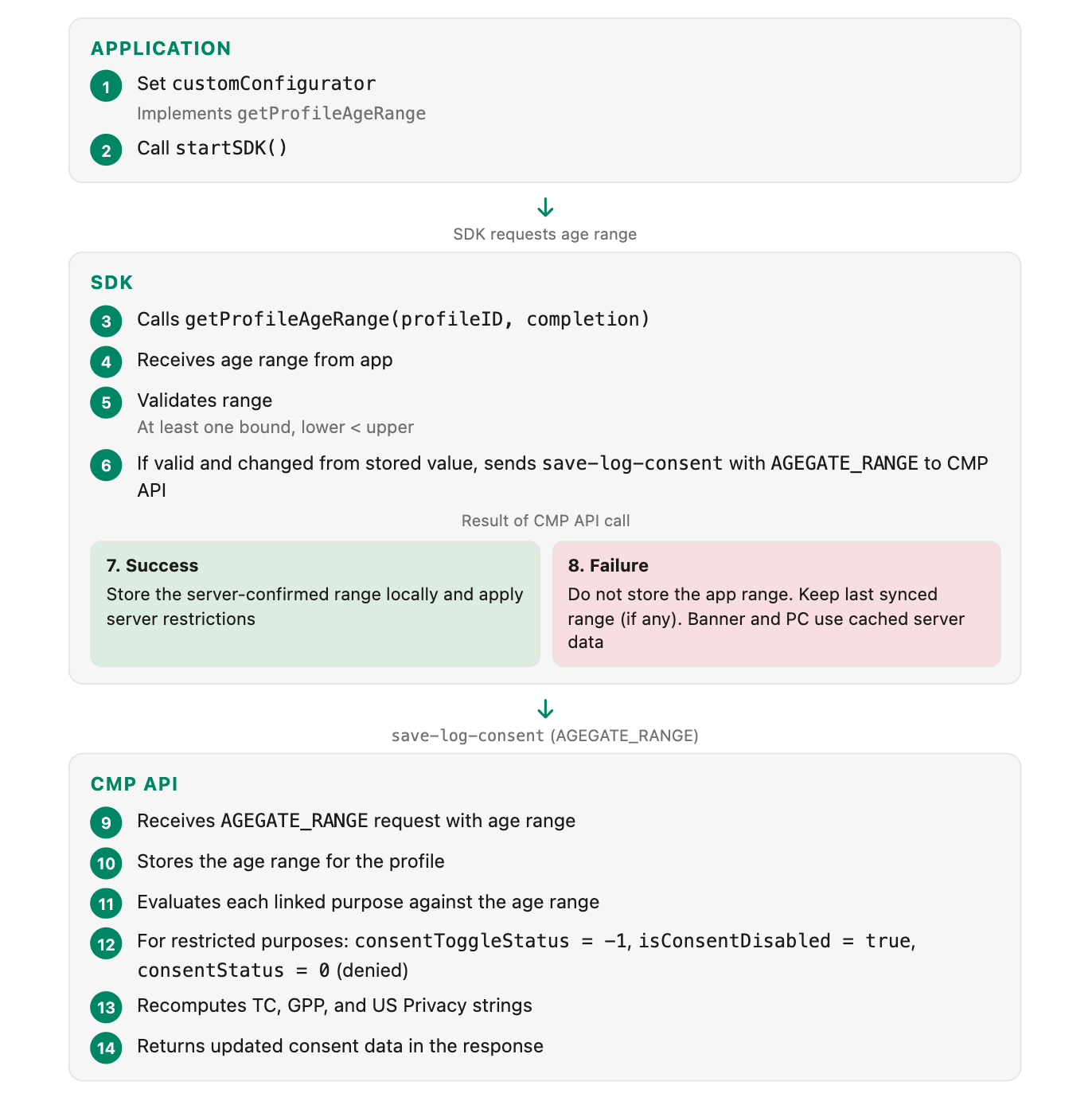
12. Troubleshooting and FAQ
Q: I sent an age range, but the purposes are not being restricted.
Check:
- Are age range groups configured and linked to purposes in the admin console?
- Is the Age Gate feature flag enabled for your organization?
- Does the user's age range actually overlap with the configured restricted age groups? (See Overlap Logic)
- Did the save-log-consent call return a success response?
Inspect prompts.ageGate.linkedCategories in the response. Verify that the purposes you expect are listed there with the correct age groups. If this field is missing or empty, the admin configuration may not be complete.
Q: How do I distinguish Age Gate restriction from a hidden toggle?
Check both consentToggleStatus and isConsentDisabled:
consentToggleStatus == -1ANDisConsentDisabled == true→ Age Gate restricted. Show a disabled toggle.consentToggleStatus == -1ANDisConsentDisabled == false→ Hidden. Do not render the toggle.
Q: Do I need to send the age range on every request?
No. Send AGEGATE_RANGE only when:
- The user's age range is first collected.
- The user's age range changes.
- The user switches accounts (send the new user's age range).
Once the CMP API has stored the age range for a profile, all subsequent responses for that profile include the restrictions automatically.
Q: Can I clear a user's age range via the CMP API?
No. Once a profile is registered with an age range, that age range persists on the profile. Even if you send null or empty values for both lowerBound and upperBound, the CMP API continues to use the last registered age range for that profile.
To change restrictions, send a new AGEGATE_RANGE request with a different valid age range. Removing an age range from a profile entirely requires admin action through the OneTrust admin console.
Q: What consent strings should I use after an AGEGATE_RANGE response?
AGEGATE_RANGE response?Always use the consent strings from the CMP API response. After an AGEGATE_RANGE interaction, the CMP API recomputes the TC, GPP, and US Privacy strings with the restrictions applied. Do not use cached or stale strings from before the age range was set.
Q: How do restricted purposes appear in consent strings (TC, GPP, US Privacy)?
Restricted purposes have their consent set to denied (0), and this is reflected in all consent string encodings. The CMP API recomputes the strings based on the final consent state.
Always use the consent strings from the response. Do not recompute them client-side.
Q: Does Age Gate affect "Accept All" and "Reject All"?
Yes. Age Gate restricted purposes remain denied regardless of Accept All or Reject All. When sending a bulk consent change to the CMP API, exclude restricted purposes from the payload. The server enforces this on its side as well.
Q: What if the AGEGATE_RANGE request fails?
AGEGATE_RANGE request fails?The CMP API did not register the age range, so restrictions will not be applied until a successful request is made. Retry the request when connectivity is restored. In the meantime, the user's consent state reflects whatever was last successfully registered.
- First-time user with no prior age range: No restrictions are applied. The user is treated as unrestricted until a successful
AGEGATE_RANGErequest is made. - Returning user with a previously registered age range: The CMP API continues to enforce the last successfully registered age range. Your client should cache the most recent successful response and use it for UI rendering until a new response is available.
Q: What happens to the age range when I call SYNC_PROFILE?
SYNC_PROFILE?The anonymous user's age range is not transferred to the authenticated profile. See Authenticated User Transition for the complete flow and API call sequence.
Q: Both ATT and Age Gate are configured for the same purpose. Which takes effect?
Age Gate takes priority. If a purpose is restricted by both ATT (not authorized) and Age Gate (age range overlaps), the response shows consentToggleStatus: -1 and isConsentDisabled: true, which is Age Gate behavior. See ATT + Age Gate for details.
Debugging Tips
- Inspect the CMP API response: Check
consentToggleStatusandisConsentDisabledvalues on each purpose to verify restrictions are being applied correctly. - Verify the admin configuration: Ensure age range groups are properly linked to the intended purposes in the OneTrust admin console.
- Check the
storageKeysin the response: Verify thattcString,gppString, andIABUSPrivacy_Stringreflect the restricted consent state.
Updated 35 minutes ago